Monday, 7 January 2013

Chapter 3 Practical

      Internet & Email

  • Internet: it is a network of computers from all over the world connected together by telephone lines, fibre optic cables and satellite.

  • To connect on the Internet, a person needs these 4 things:  
  1. A Computer System
  2. A Telephone Line
  3. A Modem
  4. Internet Service Provider
  • ISP: means for Internet Service Provider. It's a company with whom anyone wanting to connect to the Internet the person needs to subscribe.
  • WWW: stands for World Wide Web. It's the most popular part of the Internet. It contains a lot of pages of information.
  • HTTP: stands for Hyper Text Transfer Protocol. It's a set of rules which identify how files on the www are transferred.


Chapter 3 Theory

       Input and Output Devices

  1. Keyboard: this has keys that allow a user to enter data into a computer. It's application is Word Processing.
  2. Mouse: to move, it uses devices that emit and sense light to detect the movement. It's application is Menu Selection.
  3. MICR: it stands for magnetic ink character recognition. This can read texts printed with magnetized ink. It's application is Bank.
  4. OMR: Optical Mark Recognition can sense hand-drawn marks such as small shapes. It's application is correction of multiple-choice questions.
  5. Impact Printers: these are printers that make noise. Example  dot-matrix printer.
  6. Non-Impact Printers: these are printers that don't make a lot of noise. Example Ink-jet Printer.
  7. Dot-Matrix Printer: this is a printer that produces images with a print head striking mechanism.
  8. Ink-Jet Printer: this forms letters by spraying tiny drops of liquid inkon a piece of paper.
  9. Vector: it is when the image is made up of lines.
  10. Raster: it is when the image is made up of dots.


 dot-matrix printer


                                                          keyboard


mouse


Chapter 2 Practical


      Wordproccessing

  • Mail Merge: it is used to create letters by combining together a form letter and a list of data that may include names & addresses.
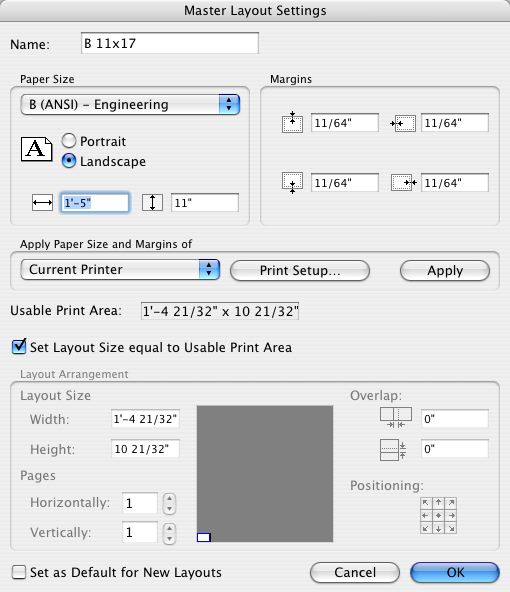
  • Layout Settings: the document contains of margins, tabs, font changes and the set and reset of italics and boldface.
  • Table of Contents: it's a list of the headings in a document and together with their page number.
  • Index: it lists the topics in a document along with the pages.
  • Columns: it's a format that is usually used by newspapers.
  • Spelling Checker: this document gives you suggestions of grammar mistake


Tuesday, 11 December 2012

chapter 2 theory

Chapter 2 Theory: Computer logic


  •  2-state device: it's like a switch on a wall,it can either be on or off
  • Binary: is a number system. It represents two-states because it has only two digits; 0 &1.
  • ASCII: American Standard Code for Information Interchange. This is used to represent characters in binary. It has 256 different characters. 
  • Unicode: it is the same as the ASCII but it has more characters.
  • With 3 bits we can represent 8 different values and with 4 bits we can represent 16 different values.


Sunday, 28 October 2012

Chapter 1: Practical

Utilities
 
  1. Compressed Folders : these are folders that are compressed to use less space and they are easy to transfer to other computers.
  2. Virus :  this is a programme that distrupts the operation of a computer.
  3. Antivirus : this is a programme to protect your computer from viruses.
  4. Formatting : when you are formatting a disk, you are dividing the disk into areas that are called tracks and sectors.
 

Monday, 8 October 2012

Chapter 1 Theory

Hi everyone,

In this post I am giong to talk about the first chapter that me and my classmates finished together. The name of the chapter is 'The Computer System'.

Data and information mean the same thing but in computer language they do not. If you have this number: 31101999, it can be a date (This is an example of data). If the same number is shown as 31/10/1999. One can recognise that this data now is a date and it becomes information.

A computer can accept data and make it into information. These are called Input and Output.
Input is the process when you enter data into the computer. The most common device to enter data is the keyboard. Then the data is processed. Getting processed data out of the computer is the job of the output devicesfor eg. printer.

There are different types of computers.Here are some examples:
  • Supercomputers - These are very powerful computers, big and are used for research
  • Mainframe computers - These are less powerful copmuters but still big, are used in banks
  • Desktop computers - Are small enough to fit on a desk. These are used in houses
  • Portable computer - These are very small. Infact you can carry it where ever you want
These are some words that were metioned in the chapter:
  • Hardware - Are things that can be seen or touched eg. keyboard.
  • Software - Is an other word for programs
  • Application Software - The software that people use to make a task eg. word processing
  • System Software - The software that the computer uses to make its own activities
  • Main Memory - Is were the data and instructions are kept
  • CPU - Is the brain of the copmuter
  • Bus  - Is a roadway which data and commands travel